Walls Controls & Player Tips
Practical habits for surviving and cooperating in Hook Inc’s Walls — not a character gacha roster.
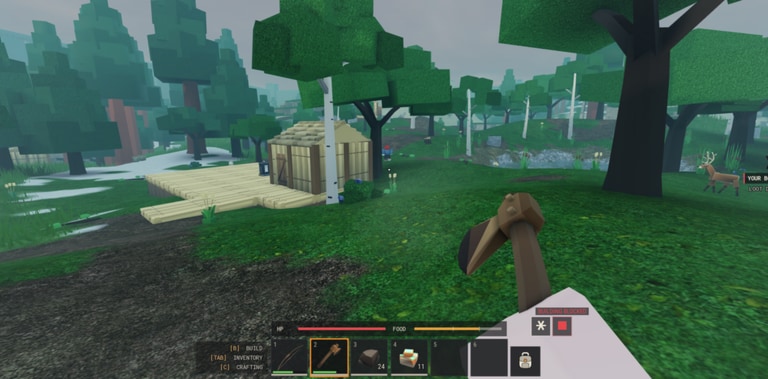
The Players Hub for Walls focuses on controls, HUD literacy, etiquette, and practical tips inside the shared Roblox world. This is not a unit database — Walls is a medieval fantasy faction survival game by Hook Inc where up to 50 players share one map, build factions, gather resources, and fight around stone fortress walls.
If you need onboarding depth, jump to Getting Started. If you need priority order, use the Tier List Hub. This page is the habits layer: how good players move, communicate, and avoid feeding the enemy team.
Default Roblox controls (confirm in Settings)
Exact keybinds can be rebound in Settings, which appears among the confirmed HUD systems. Expect the usual Roblox baseline unless you changed it:
| Action | Common default |
|---|---|
| Move | WASD |
| Jump | Space |
| Camera | Mouse / right stick |
| Sprint / higher Stamina use | Shift (verify in Settings) |
| Interact / gather | E or click prompts |
| Inventory | backpack-style key or HUD button |
| Attack | left click / primary action |
| Aim ranged | right mouse or aim bind when using bows |
Open Settings on your first spawn and note anything nonstandard. Faction mates cannot help you if your interact key differs and you never say so in chat.
HUD habits every player should automate
Official screenshots show Health, Stamina, and Hunger as persistent bars, plus Inventory, Crafting, Shop, Faction, and Settings entries. Train yourself to:
- Glance at Hunger before any long exploration route
- Glance at Stamina before committing to a wall climb or chase
- Glance at Health before accepting a duel on open ground
- Close Inventory clutter before combat so you are not scrolling mid-fight
- Know which HUD button opens Faction so you can regroup quickly
Players who only look at the fortress skybox are the ones who collapse mid-sprint. Pair these habits with Survival.
Movement tips on and around the Walls
- Walk more than you think. Sprinting everywhere empties Stamina and strands you when a fight starts.
- Use elevation. Stone walls favor defenders who peek, shoot, and step back. Standing silhouetted on a battlement is free damage for enemy bows.
- Respect weather and night. Visibility and travel safety change; plan resource runs for clearer windows when you can.
- Do not tunnel on loot. Wood piles are worthless if a spear user corners you with empty Stamina.
- Fall back to faction territory when bars are low instead of “one more node.”
Combat geometry is expanded in Combat.
Social rules that keep the server playable
Walls markets itself as all players, one world. That only stays fun if people follow light etiquette:
- Ask before stripping resources staged next to another faction’s clearly marked stockpile
- Call targets when defending a wall segment so archers and spear users are not shooting the same empty angle
- Do not bait teammates into chasing through Hunger death zones
- Keep chat readable — callouts beat spam when 50 players share the instance
- Recruit honestly: if your faction is brand new, say so instead of promising endgame upgrades you do not have
More structure lives in Factions.
Loadout mindset for new players
Think in roles, even before formal classes exist:
- Wall archer — ranged kit, high Stamina awareness, peeks from fortifications
- Gate spear — melee-focused, holds chokepoints, needs armor sooner
- Gather runner — crafting-focused, food-heavy Inventory, avoids fair fights
- Faction lead — Shop and upgrade decisions, assigns who holds which wall face
Switch roles based on what the shared world needs that hour. The Crafting & Shop guide explains how to fund those kits without garbage purchases.
Common mistakes we see early
- Treating Walls like a solo AFK clicker
- Ignoring Hunger because “combat is the real game”
- Opening Shop with panic energy after every death
- Refusing to join a faction until “later”
- Chasing unverified Codes or Scripts instead of learning controls
- Fighting at night with empty Stamina on open ground
Fix mistakes in that order and your death rate drops before any fancy tech.
Practice drills (10 minutes)
Try this short loop after reading Getting Started:
- Two minutes: only watch bars while walking the inner wall
- Three minutes: gather a small wood stack without sprinting
- Two minutes: craft or Shop one intentional item
- Three minutes: take five bow shots or spear checks from a safe parapet, resetting Stamina between volleys
Repeat once with a faction partner calling timings. Muscle memory beats reading the same tip twice.
Accessibility and comfort settings
Use Settings to:
- Lower camera shake if combat on walls feels nauseating
- Rebind awkward keys before a long session
- Confirm volume so callouts and environmental cues are audible
- Check graphics tradeoffs if weather effects tank your frame rate in a 50-player fight
A readable HUD is part of skill. Do not “tough out” a broken bind set.
When patches change the feel
Hook Inc can tune drain rates, Shop prices, or combat after the 16 October 2026 launch. After any patch note on the Updates Hub, re-test:
- Sprint distance before Stamina empty
- Hunger timeline on a standard gather route
- Bow draw cost versus melee swing cost
Then adjust your personal tips list. Official destinations stay on Official Links.
Related hubs
- Guides Hub — full walkthrough index
- Tier List Hub — what to prioritize first
- Codes / Scripts — status pages with honest empty lists for now
- Updates — timeline and what to watch
Play Walls like a teammate who reads bars, not like a highlight reel. The players who last on the Walls are usually the ones who looked boringly prepared.
Frequently Asked Questions
Quick answers to the most common Walls questions.
Where do I rebind controls in Walls?
Open Settings from the HUD. Confirm sprint, interact, and combat binds before long faction sessions.
What should I watch on the HUD while moving?
Hunger before trips, Stamina before chases or climbs, and Health before committing to open-ground fights.
Is this Players Hub a character tier list?
No. Walls is faction survival, not a collectible roster wiki. Use this page for controls and habits; use the Tier List Hub for early system priorities.
How many players share a Walls world?
Up to 50 players on one shared world, which makes etiquette and faction coordination much more important than in tiny private lobbies.
What is a good first practice drill?
A short loop: watch bars on the inner wall, gather without sprinting, make one intentional craft or Shop buy, then take a few ranged or melee checks from a safe parapet.